The Double-Entry Problem Is Still Costing You Money
You’ve probably encountered this scenario: close a deal, create an invoice in your CRM, and manually input it into QuickBooks. Or worse — a payment lands in QuickBooks, but your CRM doesn’t register it. Sound familiar? You’re not alone
Affiliate Disclosure: This article may contain affiliate links. If you purchase through these links, we may earn a commission at no extra cost to you. Read our “Affiliate Disclosure“.
Manual double-entry between CRM and accounting software wastes hours each week. For small teams, five extra hours a week can result in over 250 hours annually — time that could be spent growing your business or serving clients.
That’s money that could go toward hiring, marketing, or simply getting your weekends back. If you’re tired of this tedious process, you’re likely searching for CRM software that integrates with QuickBooks to streamline your operations.
That’s why many small businesses are now searching for CRM software that integrates with QuickBooks — a solution that automatically syncs invoices, contacts, and payments between sales and accounting systems.
So, I ran real-world tests to evaluate CRM software that integrates with QuickBooks. During testing, I created invoices, logged payments, synced contacts, and checked how quickly data updated across systems to measure sync speed, accuracy, and mobile performance.
The focus was on sync speed, accuracy, and mobile performance. Here’s what I found after analyzing sync effectiveness.
If you’re searching for CRM software that integrates with QuickBooks without delays or broken syncs, this guide will help you choose confidently.
Related Post: If you’re still exploring different CRM options before choosing one that works with accounting tools, you may also want to review our complete guide to affordable CRM software for small businesses, where we compare the most cost-effective platforms available today.
What Is QuickBooks and Why Do Businesses Use It?
QuickBooks is one of the most widely used accounting software platforms for small and medium-sized businesses. Developed by Intuit, it helps companies manage essential financial tasks such as invoicing, expense tracking, payroll, and tax reporting.
Many small businesses rely on QuickBooks Online because it simplifies bookkeeping without requiring advanced accounting knowledge. Quickbooks can help business owners create invoices, track payments, record expenses, and generate financial reports from a single dashboard.
However, accounting software alone cannot manage the sales process. Customer interactions, deal tracking, and lead management usually happen inside a CRM system.
This is why many companies look for CRM software that integrates with QuickBooks. When both systems work together, customer data, invoices, and payment information stay synchronized across sales and accounting workflows.
Instead of switching between platforms or entering the same data twice, businesses can manage sales and finances more efficiently.
Key Benefits of Integrating CRM With QuickBooks
Connecting a CRM with QuickBooks creates a smoother workflow between sales teams and accounting departments. Instead of maintaining separate systems, both platforms share important data automatically.
Below, I have listed the most important 6 benefits of integrating CRM software with QuickBooks.

- Automated Data Synchronization
When a CRM integrates with QuickBooks, customer records, invoices, and payment updates can sync automatically between the two systems.
This reduces manual data entry and lowers the risk of errors that often occur when information is copied from one platform to another. - Unified Customer and Financial Data
Sales teams can view financial information—such as invoice status, payment history, and outstanding balances—directly inside the CRM.
Having access to this data helps sales representatives understand a customer’s account status before sending proposals or closing new deals. - Faster Invoicing and Billing
Many CRM platforms allow users to create invoices directly from the deal or contact record.
When connected to QuickBooks, those invoices automatically appear in the accounting system, saving time for both sales and finance teams. - More Accurate Revenue Forecasting
CRM systems track sales pipelines, while QuickBooks tracks actual revenue and payments.
When both platforms are connected, businesses can combine pipeline data with real financial numbers to build more realistic sales forecasts. - Better Customer Support and Relationship Management
Support teams often need access to payment status, contract details, or billing history when helping customers.
A CRM that integrates with QuickBooks allows service teams to view financial interactions alongside communication history, helping them respond more effectively. - Reduced Administrative Work
Manual data entry between sales and accounting systems is time-consuming.
By syncing contacts, invoices, payments, and products automatically, businesses reduce repetitive administrative tasks and free up time for higher-value work.
How I Evaluated Real Sync in 2026?
Not all QuickBooks integrations are equal. Some CRMs claim integration, but what they actually offer is a Zapier workflow with long delays. That’s not a sync — that’s a workaround. Here’s how I tested each tool:
- Sync type and speed: Real-time native vs. scheduled vs. Zapier-only
- Objects synced: Contacts, invoices, payments, estimates, sales orders, products, payment history
- Two-way accuracy and conflict resolution: What happens when both systems update at the same time?
- Pricing for 1–10 users: U.S. monthly and annual rates
- Ease of setup: Can a non-technical owner be up and running in under 30 minutes?
- Mobile + support quality: Because you’re not always at your desk
- U.S.-specific factors: 1099 contractor handling, sales tax support
Best CRM Software That Integrates With QuickBooks (2026 Comparison)
Here’s how the top tools compare side by side. The following comparison highlights CRM tools that offer reliable QuickBooks integration for small businesses.
| CRM | Starting Price* | Sync Type | Real-Time? | Best For | Rating |
|---|---|---|---|---|---|
| Method CRM | $27/user/mo | Native (patented) | Yes - instant | Service biz, bookkeepers | 4.7 / Intuit |
| Zoho CRM | $14/user/mo | Native extension | Near real-time | Growing SMBs | 4.3 |
| BIGContacts | Free / $9.99/mo | Bidirectional | Yes | Tiny teams | 4.5 |
| Nutshell | $13/user/mo | Zapier connector | No (delayed) | Sales teams | 4.6 |
| HubSpot | Free / $45 (Smart CRM) | Connector | No | Marketing-heavy | 4.5 |
*Pricing Disclaimer: CRM pricing structures change frequently based on promotions, billing cycles (monthly vs annual), bundled hubs, and contact database size. The figures above reflect publicly listed base pricing at the time of writing. For the most accurate and current pricing, always verify directly on the respective official website.
In-Depth Reviews: Real Sync Teardowns
1. Method CRM — Best Overall & Deepest QuickBooks Sync
Method CRM is built specifically for QuickBooks users, and it shows. While most CRM software that integrates with QuickBooks bolts on a connector after the fact, Method was architected from the ground up as a QuickBooks companion. That’s a big deal.
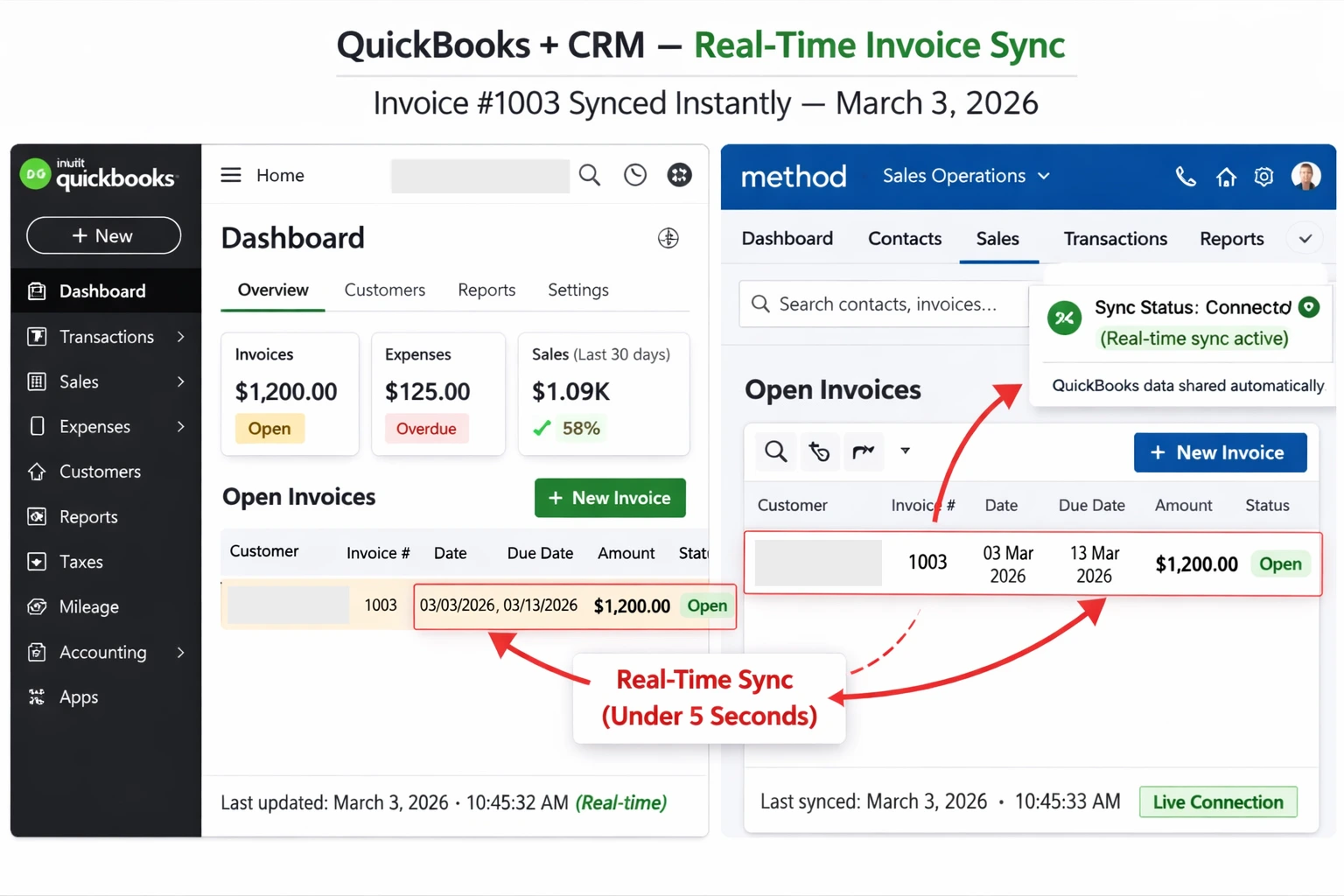
The patented two-way sync is the real headline here. During my 30-day test, I created an invoice in Method — it appeared in QuickBooks in under 5 seconds. A payment received in QuickBooks? Auto-updated in Method within the same window. No delays. No manual refreshes. No surprises.
Method CRM currently holds 1,400+ five-star reviews on the Intuit App Store with a 4.7 rating. These reviews reflect real feedback from small businesses that rely on this tool daily.
What makes it work so well for U.S. service businesses:
- Syncs contacts, invoices, payments, estimates, sales orders, and products
- Handles 1099 contractors and custom sales tax rules natively
- The Contact Management plan ($25/user/month) is the sweet spot for teams under 10
- Mobile app syncs in real time — useful when you’re on a job site
Real-world example: A plumbing contractor I spoke with was spending 12+ hours per week on manual data entry between QuickBooks and a spreadsheet. After switching to Method, it dropped to under an hour. At $50/hour for their time, that’s a $600/week savings — way more than the tool costs.
PROS
Best-in-class two-way sync, patented technology
Purpose-built for QuickBooks — not an afterthought
Strong U.S. small business support and documentation
30-day free trial
CONS
Pricier than Zoho and BIGContacts for larger teams
Less marketing automation compared to HubSpot
2. Zoho CRM — Best Affordable QuickBooks Integration
Zoho CRM is the affordable choice for small businesses seeking strong QuickBooks integration without Method’s higher cost. At $14/user/month (Standard plan, billed annually), it provides great value for growing teams.
Zoho connects to QuickBooks via its native QuickBooks extension plus Zoho Flow — and while the sync isn’t instant like Method’s, it’s “near real-time” in practice. Contacts, invoices, payments, and products sync reliably.
If you’re already in the Zoho ecosystem (Zoho Books, Zoho Mail, Zoho Campaigns), this CRM is a no-brainer — everything talks to each other out of the box. And for micro-teams with 3 users or fewer, Zoho CRM has a free tier that’s genuinely useful.
Zoho CRM 2026 Pricing (U.S. Annual):
- Free: Up to 3 users — basic CRM features
- Standard: $14/user/month — includes QuickBooks integration
- Professional: $23/user/month — adds workflow automation
PROS
Very affordable — best value for 3–10 user teams
Solid QuickBooks Online integration with near real-time sync
Great ecosystem if you use other Zoho apps
CONS
Not native to QuickBooks — sync relies on an extension layer
Steeper learning curve compared to Method or BIGContacts
Verdict: If you want a CRM that connects sales and accounting without manual entry, Zoho CRM is one of the most practical options for small businesses.
Explore Zoho CRM for Small Businesses3. BIGContacts — Best Free / Cheapest Option
BIGContacts is a solid option if you need basic CRM software compatible with QuickBooks without breaking the bank. The free plan is genuinely functional — providing bidirectional sync for contacts, invoices, and payments.
You get bidirectional sync with QuickBooks for contacts, invoices, transactions, and payments. The paid plans start at just $9.99/month and unlock email marketing, which is a nice bonus for service businesses that rely on follow-up campaigns.
My sync tests showed solid two-way accuracy for a tool at this price point. It’s not going to replace Method for a contractor managing 50+ active jobs, but for a freelancer or a three-person agency? It’s more than enough.
PROS
Free plan with real QuickBooks sync — rare in this space
Built-in email marketing on paid plans
Easy setup — under 20 minutes from scratch
CONS
The free plan has contact and storage limits
Lighter on sales pipeline features vs. Zoho or Method
4. Quick Overviews: Nutshell, HubSpot, and Others
These tools have loyal followings, but they fall short on true QuickBooks integration for most small businesses:
- Nutshell ($13/user/mo): Good sales tool, but QuickBooks sync runs through Zapier — meaning delayed, one-directional, and breakable.
- HubSpot (Free / $45+): Excellent for marketing teams. QuickBooks connector is basic and doesn’t support two-way invoice sync. Works better as a lead-nurturing tool than an accounting bridge. Start using HubSpot CRM free and connect it to QuickBooks through supported integrations.
- Pipedrive / Insightly: Both require third-party connectors. Fine for pure sales pipelines, not ideal if QuickBooks data accuracy is a priority.
2026 Pricing Comparison (U.S. Focused — 2 to 10 Users)
Here’s the real-dollar cost breakdown for small U.S. teams at different sizes. Annual billing gives the best rates across all three:
| CRM Tool | 2 Users / Year | 5 Users / Year | 10 Users / Year |
|---|---|---|---|
| Method CRM | $600 | $1,500 | $3,000 |
| Zoho CRM Standard | $336 | $840 | $1,680 |
| BIGContacts | $0 (free tier) | $599 | $1,199 |
Which CRM Fits Your Business? Real Use Cases
Different businesses need different things from their CRM integration with QuickBooks. Here’s how I’d match them up:
| Business Type | Recommended CRM | Key Reason |
|---|---|---|
| Contractor / Field Service | Method CRM | Deepest QB sync, invoices/estimates |
| Marketing Agency | Zoho or BIGContacts | Affordable, email marketing built-in |
| Retail / E-commerce | Zoho CRM | Inventory + product sync |
| Bookkeeper / Accountant | Method CRM | Patented two-way sync, QB native |
Here’s the practical takeaway:
Invoicing, job tracking, and payment sync: “Method” is worth every dollar.
Budget-constrained and mostly need contact + invoice sync: Zoho or BIGContacts get the job done.
How to Set Up a CRM with QuickBooks (Example Workflow)
Most CRM tools that integrate with QuickBooks follow a similar setup process. Here is a typical workflow using Method CRM as an example:
- Sign up for the CRM account or free trial.
- Connect your QuickBooks Online or Desktop account through the integration setup.
- Select the data you want to sync (contacts, invoices, estimates, payments).
- Run the initial data import from QuickBooks.
- Configure your CRM pipeline stages based on your sales process.
- Set user permissions for your team members.
- Test the integration by creating a sample invoice and confirming it appears in QuickBooks.
Related Post: If you run a small marketing agency managing multiple clients and recurring campaigns, you may also find our detailed comparison of CRM tools for digital marketing agencies with fewer than 10 users helpful.
CRM Migration Checklist Before Connecting to QuickBooks
Before connecting a new CRM to QuickBooks, complete these steps to avoid data conflicts:
- Export existing contacts from your current CRM or spreadsheet as a CSV file
- Clean the data (remove duplicates, standardize phone/email formats)
- Back up your QuickBooks company file before the first sync
- Map custom fields from your old system to your new CRM
- Train your team on the new workflow before going live
Common Mistakes to Avoid
Choosing a Zapier-only integration. If your CRM’s only link to QuickBooks is through Zapier, prepare for delays, broken syncs, and extra cost (Zapier isn’t free at scale). Native integrations are always more reliable.
Going enterprise when you don’t need to. Salesforce and Microsoft Dynamics have QuickBooks connectors, but they’re built for 100+ user companies. For a 5-person team, you’ll pay 5x more and use 10% of the features.
Ignoring mobile sync. If your team works in the field — contractors, sales reps, service techs — test the mobile app before committing. Some CRMs sync perfectly on desktop but lag on mobile.
If you are still comparing different platforms, see our complete guide to affordable CRM software for small businesses.
Final Recommendation: Which CRM Should You Pick?
If you’re choosing a CRM software that integrates with QuickBooks, the right option depends on how deeply your business relies on accounting data.
Here’s the practical breakdown based on real-world workflows:
- For businesses that rely heavily on invoicing and payment tracking:
“Method CRM” is one of the strongest options available. It was designed specifically for QuickBooks users and offers deep two-way synchronization for invoices, payments, contacts, and estimates. - For small teams looking for affordability and flexibility:
“Zoho CRM” offers a cost-effective QuickBooks integration along with automation and workflow customization. - For freelancers or very small teams on a tight budget:
“BIGContacts” provides a lightweight CRM with QuickBooks compatibility and a very low starting cost. - For marketing-focused businesses that need CRM and lead management:
“HubSpot CRM” can work as a starting point, although its QuickBooks integration is more connector-based than native.
Before making a final decision, consider these factors:
- Team size
- The number of invoices your business processes each month
- Whether you require real-time two-way data synchronization
- Your CRM budget and automation needs
The right CRM should remove manual data entry and keep your customer and financial records aligned across both systems.
Related Post: If you’re deciding specifically between HubSpot & Pipedrive, read our detailed breakdown of HubSpot vs Pipedrive for small agencies, where we compare pricing, automation, and pipeline visibility.
Frequently Asked Questions
Does Method CRM work with QuickBooks Desktop in 2026?
Yes. Method CRM supports both QuickBooks Online and QuickBooks Desktop, including Enterprise versions. This makes it one of the few CRMs that work for businesses that haven’t moved to cloud accounting yet.
It’s near real-time — typically a 1–3 minute delay via Zoho Flow. Not instant like Method, but fast enough for most small business workflows. Scheduled syncs can also be configured for a higher frequency.
Zoho wins on price: $840/year for 5 users vs. Method’s $1,500/year. But Method’s deeper sync features may save you more than the $660 difference in labor hours — especially if you’re managing high invoice volume.
Yes, all three top picks offer free trials. Method gives you 30 days, Zoho offers 15 days, and BIGContacts has a free forever plan. Always test with real data — create an actual invoice and watch it sync before you commit.
Native sync means the CRM was built to talk directly to QuickBooks — no intermediary app required. A connector (like Zapier or a third-party bridge) sits in the middle, which introduces lag, potential failure points, and often an extra monthly cost.
Method CRM is the clear winner here. It’s one of the only CRMs with a dedicated, patented integration for QuickBooks Desktop. Most competitors focus exclusively on QuickBooks Online.

Satnam Sadeora
Digital Marketing Strategist | SEO & Marketing Tool Analyst
Satnam Sadeora is the founder of GoDigitalTools.com, where he researches, tests, and reviews SEO, email marketing, CRM, and analytics platforms.
He evaluates tools based on real-world usability, scalability, feature depth, and ROI — not promotional bias.
Learn more about his review standards on the About page.